
How to choose client gallery software for event work
Choose a platform by replaying a real handover: who prepares it, who receives it and what should happen after the link opens.
Client gallery software is often assessed with a handful of beautiful photographs and an attractive opening screen. That reveals presentation, but misses much of the job: preparing files, controlling access, explaining the delivery and answering questions after the link is sent. For a business handling several events, those steps matter as much as appearance.
Before comparing platforms, choose one representative service and describe its complete handover. Use a common job rather than an exceptional event requiring every imaginable option. The purpose is to establish whether the software helps with ordinary work and makes the client's next action clear.
Key takeaways
- Separate essential delivery tasks from attractive optional features.
- Test the recipient's journey without the manager's signed-in session.
- Assess preparation, support and exit work alongside storage.
1. Write a delivery brief before a feature checklist
Identify the person preparing the event, the contributors and the recipients. An independent photographer may prepare a proofing selection alone. An agency may need client approval before releasing media. A photobooth company will be particularly interested in the path between completed booth exports and a browsable gallery.
Then describe the recipient's task: browsing, downloading, choosing images or listening to messages. If different audiences need different material, record that requirement at the start. An attractive album structure does not necessarily provide separate permissions for each group.
2. Rank requirements by their effect on the job
An essential requirement should correspond to something you actually do. A possible future feature can remain on a secondary list. This prevents choosing a complicated platform for an option the business never uses.
Write down the evidence expected for each requirement. Replace 'easy to use' with 'a client can find their album and download a file on a phone'. Replace 'secure' with the specific access method, its test and the people authorised to change it. These descriptions make competing products easier to assess consistently.
| Need | Evidence to request | Question to resolve |
|---|---|---|
| Deliver mixed media | Open a prepared photo, video and audio file | Formats actually tested |
| Collect a choice | Submit and retrieve a defined selection | Favourites versus final approval |
| Separate clients | Prepare two distinct deliveries | Events, albums and permissions |
| Apply branding | Review the result on a phone | Logo, colours and white-label limits |
3. Run a trial with representative exports
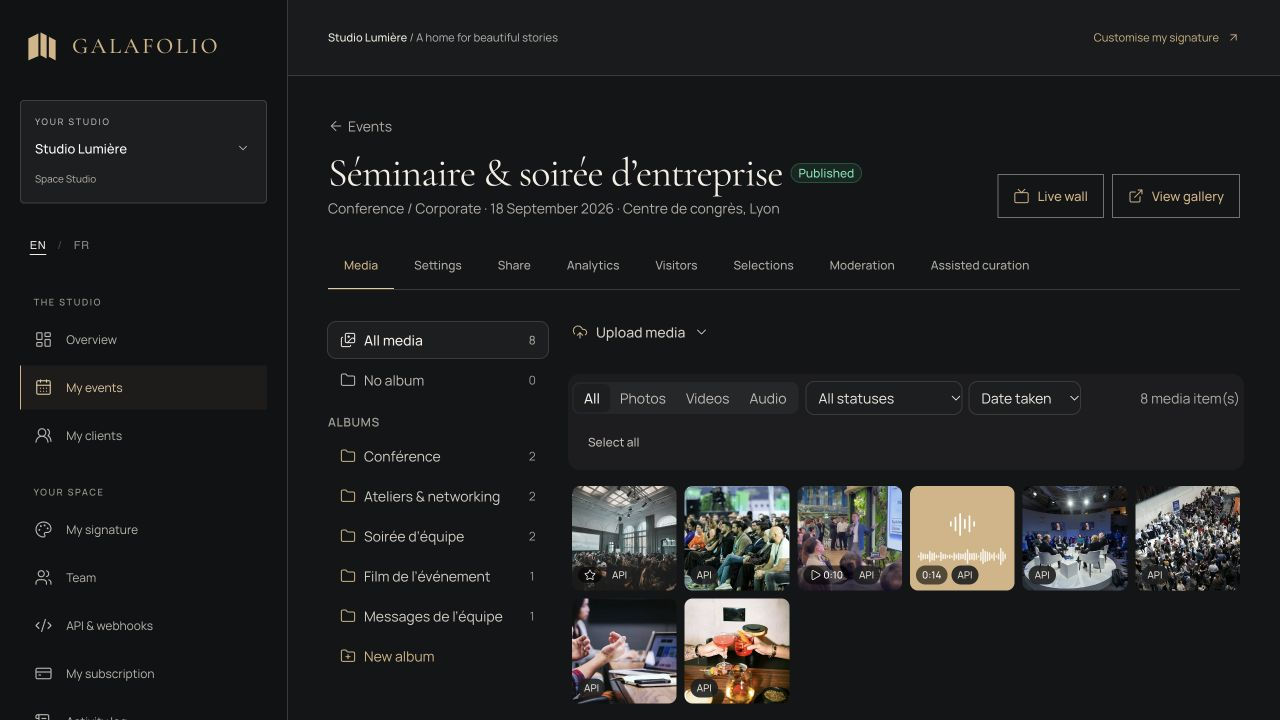
Prepare a small batch resembling your production: portrait and landscape images, a finished video and an audio recording if you deliver one. Include a long filename and several albums. Use illustrative material for an initial trial when confidential client media is unnecessary.
Check import, publication and retrieval as separate steps. A correct thumbnail does not prove that the downloaded original is the expected file. Also examine how an unsupported format is handled. A clear refusal and preparation method are more useful than a general compatibility promise that nobody has tested.
- Import the batch and count the visible files.
- Open media on a computer and a phone.
- Retrieve an allowed download and check its name.
- Confirm unpublished files do not appear in the visitor journey.
4. Separate the studio from the client experience
The manager's interface can show controls unavailable to visitors. Open the delivery link in a window without the studio session. Evaluate a password, PIN or email access journey from the recipient's side, including the instruction they receive with the link.
Ask someone who did not prepare the event to read that instruction. Find out what they think they should do next. If they look for an unnecessary registration or confuse contributing with browsing, improve the message or journey before judging only its visual design. A successful trial should include this outside perspective.
5. Assess the whole operating cost
Storage is only part of operating the service. Include time spent sorting, checking and supporting a delivery. A manual action acceptable for one event may become difficult during a busy week. Time your own trial to produce an estimate relevant to your team instead of assuming a context-free efficiency claim applies to you.
Check the publisher's current plan conditions: storage, active events, collaborators, downloads and retention. Do not assume that one plan's limits apply to another. Galafolio's plan catalogue currently remains a demonstration, and no payment is collected through that journey. Treat that limitation as part of the evaluation.
6. Plan the end of the handover
Find out what happens when an event expires and how you recover the material you need. The client should know how long the gallery remains available and which files they must preserve themselves. Keep production sources and delivered exports in a separate archive.
Finish with a simple decision rule: the platform must complete essential tasks before optional conveniences influence the choice. Record observed limits and unresolved questions. This produces a decision the team can explain and repeat, rather than one based on a single attractive screenshot or a feature name.
Put the method into practice
In Galafolio, explore a demonstration and then prepare a trial event with the same requirements as your next service. Albums, mixed media, access controls and client selections solve different problems. Enable the parts that belong in the brief and verify the resulting visitor experience.
Client gallery software is a good fit when it makes a handover understandable, repeatable and testable. The decision matrix and sample batch remain useful even if you ultimately select a different platform.
Common questions
Should I choose the platform with the most features?
Start with the essential steps in your services. Extra capabilities matter when they answer a defined need and your team can operate them successfully.
Does a gallery replace a straightforward file transfer?
A gallery adds presentation and interactions that help some deliveries. A recipient who simply needs a known batch may only require a transfer. The linked guide explores that decision.
How do I keep a trial close to ordinary work?
Use representative exports, your usual filing structure and a realistic access journey. Have a recipient unfamiliar with the studio test the handover.