
White-label galleries: design the whole client experience
Your brand appears in the journey's decisions as well as its colours. Prepare the gallery as a deliverable from your business.
Adding a logo is a visible part of a branded gallery, but it is not the whole handover. Clients also encounter an event name, albums, access instructions and a delivery message. If those elements contradict each other, a familiar logo does not make the experience coherent.
For an agency, photographer or event supplier, white-label presentation should be planned at service level. This method helps choose the identity shown, organise contents and check the journey before sending the link. It does not assume that every platform includes all domain, email and interface customisation options under one label.
Key takeaways
- Event naming, album structure and handover messages contribute to identity.
- Check branding in the actual gallery on the recipient's device.
- Verify the exact scope of customisation before promising it.
Decide whose identity the recipient should recognise
An event involving an agency, venue and several media producers can leave recipients unsure who is responsible. Agree which identity appears in the handover and who answers questions. The purpose is to make the relationship understandable without implying that a supplier performed work outside its actual role.
Make that decision before preparing brand assets. It prevents a page from accumulating competing logos, signatures and labels. Also preserve separate events for separate clients. Visual customisation is not a substitute for keeping unrelated deliveries and their audiences apart, even when the same operator prepares them.
Break white labelling into distinct requirements
A customisable interface, a dedicated domain and a delivery email address are different capabilities. Ask what is available, how it is configured and which limitations remain. A roadmap item is not an operational service, and a feature name does not establish that every related component is included.
Galafolio supports gallery logo, colour and presentation customisation. The platform being published on galafolio.com does not prove that every client can automatically connect a custom domain with all associated services. Confirm that requirement within the service scope before promising it to a customer. Treat address configuration separately from visual identity.
| Dimension | Question | Useful evidence |
|---|---|---|
| Visual identity | What can be customised? | A real gallery on a phone |
| Browsing address | Which domain is actually used? | Final link opened without a session |
| Handover message | Who is identified as the contact? | A complete reviewed instruction |
| Available functions | Which options are operational now? | A test of the promised journey |
Test readability before judging a mockup
Prepare a logo legible at a small size and colours that leave actions and text understandable. Review them on a phone with the photographs and recordings you intend to show. A palette looking attractive on a desktop can make an action difficult to recognise on another device.
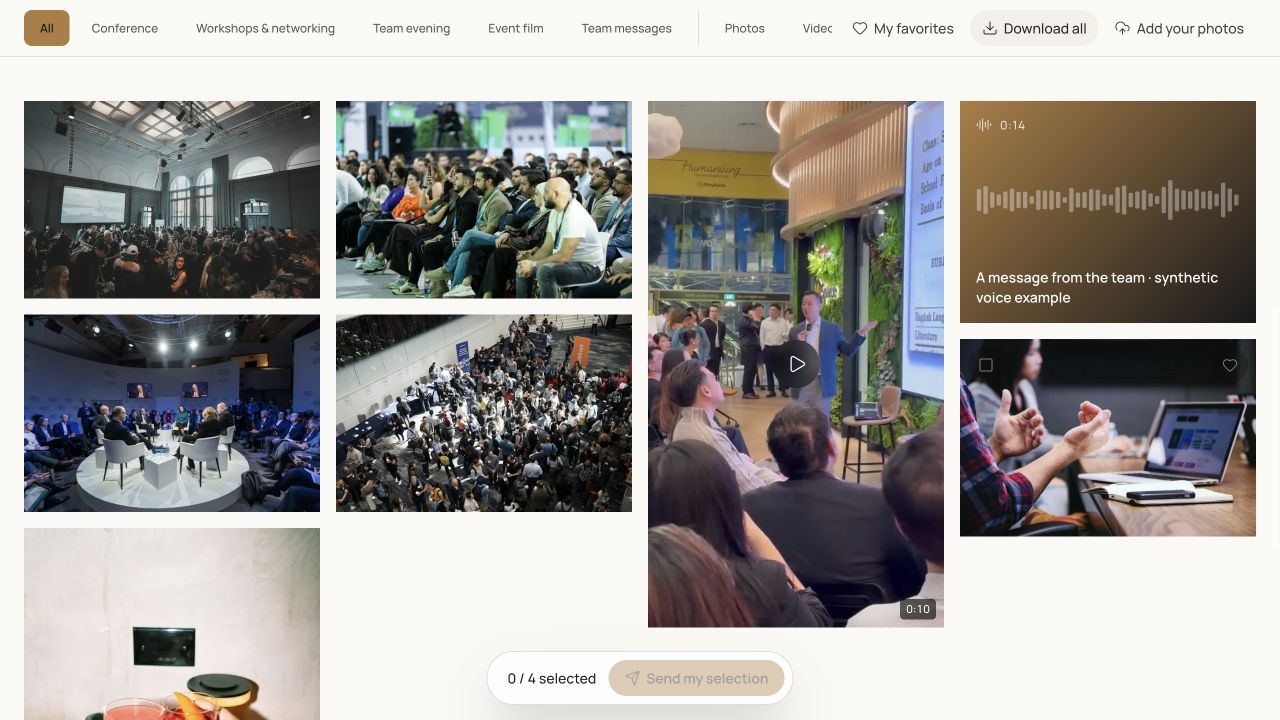
Include long event names, album titles and media without a photograph, such as audio messages. The trial should cover several reading situations. Branding should support the contents and the recipient's next action rather than bury useful information beneath decorative decisions. Check the gallery itself rather than only the uploaded asset.
Give the handover a recognisable structure
Choose a precise event name and albums using the client's vocabulary. Programme labels may guide a corporate event. Moments and kinds of memories may feel more natural for a private celebration. Do not inherit the production folder structure when it does not help visitors understand the delivered material.
Presentation order communicates importance. An approved batch, principal film or audio messages should be findable without unnecessary exploration. If delivery happens in stages, preserve stable landmarks. A coherent structure contributes to the experience of your business as much as typography, while remaining useful if a recipient ignores the introductory text.
Match the handover message to the settings
Write a short explanation identifying the contents and next action. Clients should understand whether they are browsing a final delivery, choosing photographs or contributing files. Reusing an identical message for these situations creates ambiguity even when the gallery looks consistent.
Check each promise: public or protected access, permitted downloads, available files and availability period. A message advertising a download that is disabled creates a problem no logo can resolve. Keep the instruction accurate for someone who receives it by forwarding and was not involved in the project. They should not need the original conversation to understand the link.
Make the presentation repeatable for the team
Create a short internal check before each handover. Include displayed identity, albums, access, downloads and the support contact. The person approving it should open the visitor journey without their studio session, because management controls do not represent the recipient's experience.
Preserve reusable business decisions while reviewing each event's particulars. A shared procedure helps staff prepare deliveries; it does not justify copying client names, permissions or private information between events. Consistency should coexist with proper separation. The useful standard is that another team member can prepare and verify the same quality of handover.
- Brand and support contact are identifiable.
- Contents use the client's vocabulary.
- The presentation is legible on a phone.
- Instructions match actual functions and access.
- The final journey was opened without a manager session.
Put the method into practice
A white-label gallery works when recipients recognise their provider and understand the delivery. A logo helps, but coherence also comes from structure, instructions and the actions offered. Treat those elements as parts of one service.
Prepare that identity in Galafolio's studio and review the client gallery. If your project needs a specific domain or email arrangement, make it a separate requirement to confirm rather than assuming it follows automatically from white-label wording.
Common questions
Does white label always mean a custom domain?
No. Visual options, browsing address and email identity are distinct. Verify what the chosen service actually provides.
Should every contributor's brand appear?
Agree a principal identity and useful acknowledgements with the parties involved. Recipients primarily need to understand who provides the handover and answers questions.
How can I check the result quickly?
Open the visitor link on a phone without the studio session. Review the event name, albums and instructions, then perform the action promised to the client.