Your brand. Their memories.

Collect a clear client photo selection before editing

A photographer needs to know which images the client has actually chosen before starting the agreed editing work. A collection of casual favourites is not always a final instruction.

Use Galafolio's client selections to define that handover. Explain the number of images expected, how the client submits the set and what will happen after submission.

For your client: their gallery
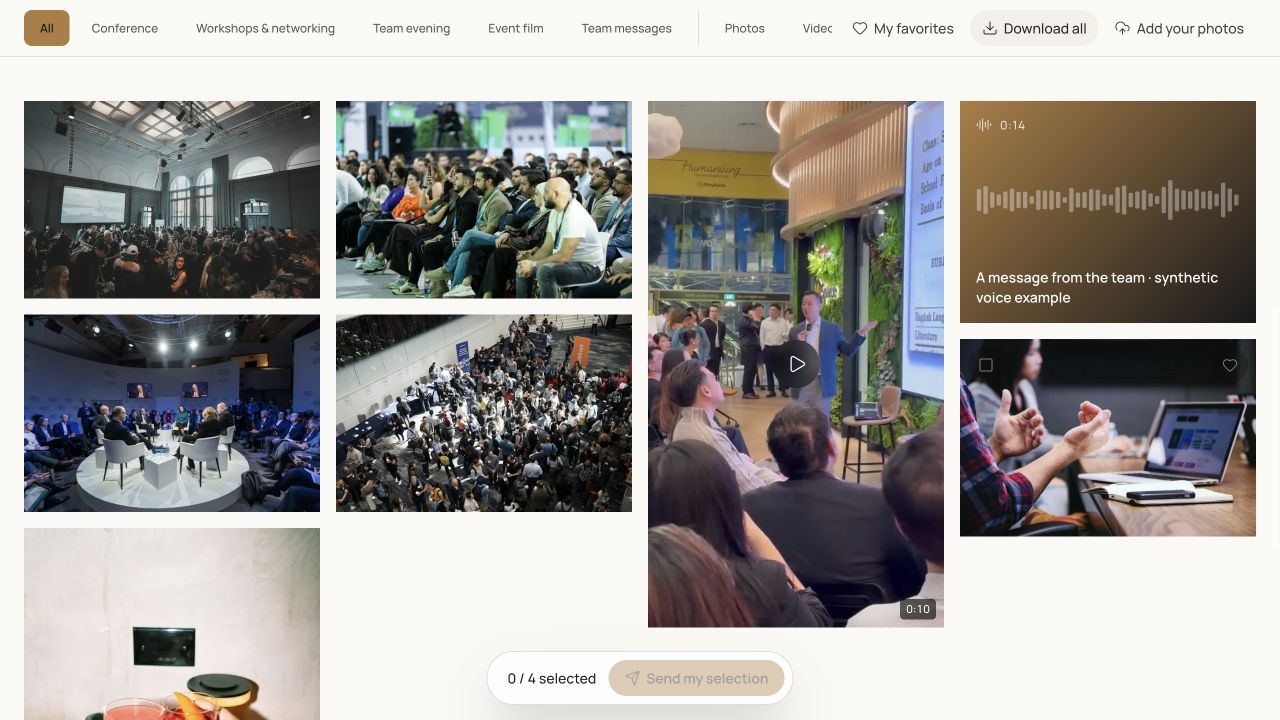
Actual Galafolio client gallery screenshot: albums, favourites, downloads and demo audio messages.Enlarge

Real product screenshot. Fictional event and demonstration media.

01

Agree the selection brief first

Tell the client what the selection is for: retouching, an album shortlist or another agreed delivery. Set a suitable selection limit and use stable filenames. If images may be replaced or renamed, complete that work before asking the client to choose so the selected references remain understandable.

02

Distinguish browsing, favourites and submission

A visitor may mark favourites while exploring. The professional workflow needs a submitted client selection that the team can review as a defined set. Explain the submission action and the review deadline in the handover message. If changes are needed after submission, use the studio's reopening workflow rather than accepting ambiguous additions through several channels.

03

Bring the chosen references into editing

Review the submitted set in the studio and retrieve its filenames through the available copy or CSV actions. These references can help locate matching files in your editing catalogue. Galafolio provides a manual filename handover, not a native Lightroom publishing or synchronisation plugin. Keep your own source naming consistent and check that every requested image maps to the correct original.

Put it into practice

A workflow to prepare.

  1. 01

    Define the purpose, limit and deadline of the selection.

  2. 02

    Ask the client to submit the final set through the gallery workflow.

  3. 03

    Check the filenames against the production originals before editing.

The Galafolio journal

Methods for your next client handover.

All articles

Useful answers

Are favourites the final client order?

Treat favourites as browsing aids unless your agreement says otherwise. The submitted selection gives the team a clearer set to review and process.

Does Galafolio synchronise edits with Lightroom?

No native Lightroom synchronisation is provided. Use the copied filenames or CSV as references and verify them in your own editing workflow.

The next story

Prepare your first delivery.

Open my space

Starter includes 3 active events. No payment is collected in the current demonstration.

Explore further

Explore Galafolio.