
Deliver event photos, video and audio with one quality process
Different formats can share one gallery. Each still needs its own checks before the client receives the link.
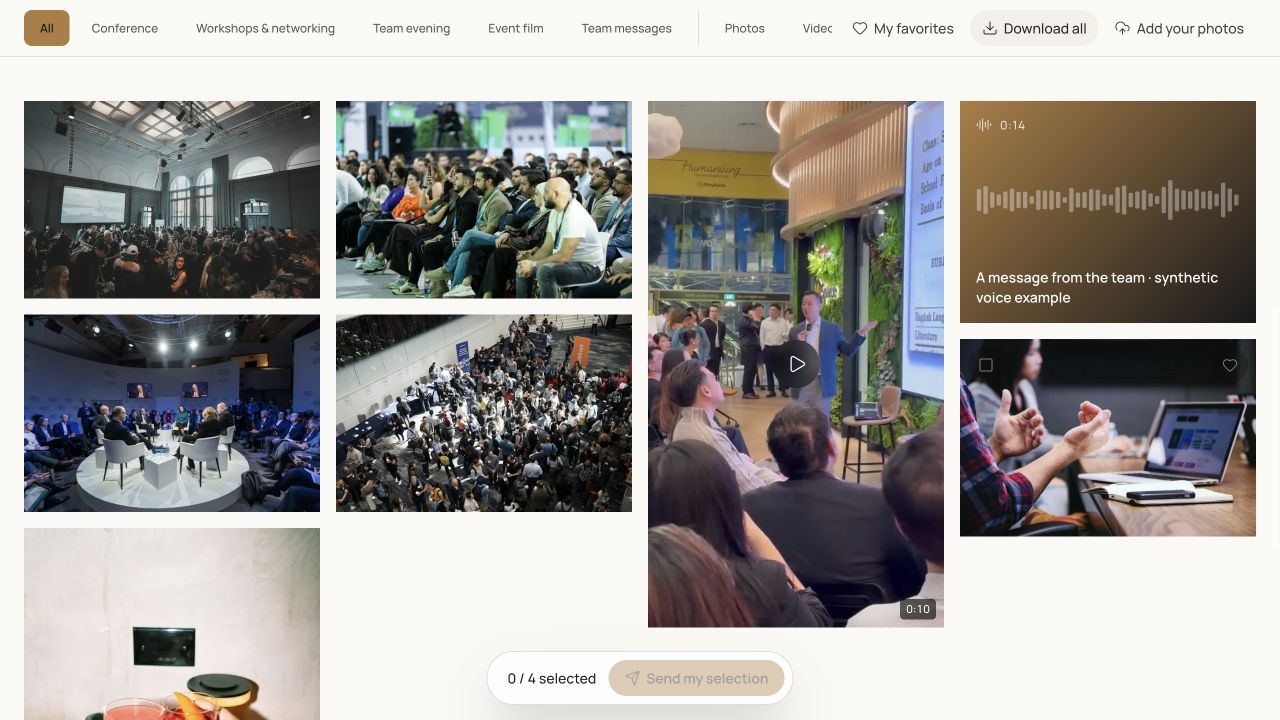
An event handover can combine photographs, a film and audio messages produced by different people. Bringing them into one gallery simplifies browsing, but does not automatically resolve version, naming and quality problems. A video can import successfully while still being the wrong export.
A common quality process checks the coherence of the batch while preserving the checks each format needs. The method below begins with production sources and ends with the recipient's experience. It is useful when a team delivers several media types even though individual production tasks continue in different editing tools.
Key takeaways
- Separate production sources from client-ready exports.
- Check file contents rather than trusting extensions or thumbnails.
- Compare the published batch with a delivery list before sharing.
Create a delivery manifest
Describe what must be handed over: a photographic series, final film, individual messages or other agreed material. Give each batch an owner, version and destination. This list becomes the reference after import. Without it, a missing file can remain unnoticed inside a gallery that already appears full of content.
Keep production sources separate from exports approved for the client. Working folders can contain tests, variants and intermediate files that do not belong in the gallery. Do not treat an entire directory as the final handover simply because the material is available. The approved set should be a deliberate production decision.
| Field | What to record | Purpose |
|---|---|---|
| Batch | Recognisable name and expected media | Identify missing contents |
| Version | Export selected as final | Exclude tests |
| Owner | Person approving the contents | Obtain a decision |
| Destination | Event, album and audience | Avoid sharing to the wrong place |
Review photographs as finished images
Prepare delivery exports with orientation, appearance and resolution appropriate to the agreed need. Examine representative photographs, including portrait, landscape and visually difficult examples. Check names and structure, then count the batch you intend to make visible. A sample should reflect actual production rather than only the easiest images.
Galafolio is not a RAW production archive: RAW inputs are refused. Do not assume HEIC works in every processing environment. A tested JPEG export is a practical starting point for photographs intended for varied browsers. Preserve camera sources in your own production organisation and distinguish those sources from what the client has been promised.
Separate file format from actual playback
For video and audio, an extension alone does not establish compatibility. MDN's documentation distinguishes containers from the codecs they may hold. A familiar filename therefore cannot, on its own, guarantee the expected playback. The resource is linked below for technical export decisions.
For handover, use a concrete rule: test the final export in the target browsers and devices. Also check a retrieved download when that action is offered. If a format causes trouble, prepare another export in your production tools and verify it before replacing the published version. Renaming a file extension is not a conversion and does not resolve an incompatible encoding.
Look and listen beyond the first preview
A thumbnail helps identify a file but does not validate its full duration. For a video, examine the beginning, middle and end, picture, sound and embedded titles. For audio, check intelligibility, cuts, silence and level differences between messages. Record any intervention needed before considering the batch ready.
Decide who performs that work and who approves the result. Galafolio presents prepared media; it does not automatically repair sound, transcribe speech or assemble a film. If such deliverables belong in the agreement, they need a production process of their own and should not be assumed to happen merely because files were uploaded.
Check visible contents, not only received files
After importing, compare received material with the agreed manifest. Check albums, versions and visibility. If guests contributed during the event, distinguish review of their files from approval of professional exports. A technically received file is not automatically a decision to distribute it to the whole audience.
Open the visitor link without your studio session. Browse albums, play each media type and retrieve an allowed download. Test the agreed access journey too. These checks establish what recipients can actually do rather than what the manager's controls might lead the team to assume. Check the final version of the instructions against that experience.
- Files match the approved manifest.
- The right versions are visible.
- Unapproved media remain outside the visitor journey.
- Playback and downloads were checked separately.
Finish with instructions and a separate backup
The handover message should identify available contents, album organisation and expected actions. When batches arrive at different times, name them and explain the current delivery state. A recipient should not have to guess whether an absent film is still in production or has been forgotten.
State gallery availability and the files recipients should preserve. Keep a separate backup of sources and exports, and advise the client to retain delivered files. The quality of a handover extends beyond a successful first page view. It includes a comprehensible method for finding the right material, retrieving it and keeping it outside the online presentation.
Put the method into practice
A coherent mixed-media gallery brings formats together without confusing their checks. The delivery manifest verifies the whole batch. Image review, listening and playback verify the individual parts and reveal problems that a successful import cannot establish on its own.
Start in Galafolio with a representative sample, check the journey on a phone and computer, then review the complete batch before sharing. Keep the linked media preparation guide available as an operational reference for the team.
Common questions
Will an imported video necessarily play everywhere?
No. Test the export in the intended environments. An accepted file and correct thumbnail do not establish full playback on every device.
Can the gallery be the only backup?
Preserve a separate production archive and explain file preservation to clients. An online presentation should not become an implicit promise of unlimited retention.
Why check the downloaded file as well?
Recipients may need to preserve or use media outside the gallery. The check confirms the version and filename they actually retrieve.